Every Cell phone plan has advantages and Disadvantages. Having used T-Mobile for the last 15 years I have come to realize that the perks a cell phone company offers can either make or break that company.
Recently I became aware of Google Project Fi (Fi as in Wi-Fi). This is a cell phone plan created by Google. Although this plan doesn't include many of the perks of other plans such as T-Mobiles ability to stream music and videos without using data it has a couple of major advantages that make it worth checking out.
First, Project Fi uses both the Sprint and T-Mobile cellular network. Although neither of these networks is as large as say Verizon or AT&T together they provide very competitive coverage. T-Mobile has decent coverage where I live but I have noticed when I travel to places such as Idaho or rural parts of Utah that the coverage is not as great. Sprint on the other hand has some decent and surprising coverage in certain rural areas. Project Fi gives the best of both worlds. You can use both networks and it strives to place you on the data network that has the fastest speeds in the location you are at.
Second, You don't have to pay for the data you don't use. I am not really a heavy data user. On T-Mobile I had a 1 GB per month plan. I used maybe 300 MB on any given month. Although Some data plans allow you to carry over your data to the next month and build up a reservoir of unused data I personally like Project Fi's Idea better. If you don't use the data you don't have to pay for it. 1 GB of data - $10 or $1.00 per 100 MB. With Project Fi you only pay for what you use. This means that you don't have to pay $40 per month for 2GB of data that you will never use. Instead you get reimbursed for the data you don't use so you may only pay $23 + Tax if you only use 300 MB's. To me this is a great service. It also works out well for people who use a lot of data. If you go over your assigned allotment they will simply add the excess amount to your next months bill. You don't pay overages either so its a winning situation.
Third, If you use the Google hangouts app then you can receive text messages on all your devices. This includes computers and tablets. As long as your Google account is connected to that device. This can be extremely convenient. I don't really like carrying my phone around with me so if I am nearby a computer or using my tablet it is nice to have text messages show up on that device.
Despite these two advantages Google Fi has one major flaw. The network currently only supports three phones, the Nexus 5x, 6P and 6. Having used a Nexus phone for the last two years I am fine with this. However, if you are a fan of the Samsung Galaxy line or iPhone you are out of luck. Nexus phones are cheap but they may not have all the features that you are used to with your galaxy or iPhone.
Overall if you don't mind using a Nexus phone I would definitely give Project Fi a try. The base price is $20 per month which is also a great deal. Over the past month of using this service I haven't had any problems.
Friday, November 27, 2015


Saturday, January 24, 2015
Photoshop CC (2014)
To those not familiar with the many hats that librarians
wear, it may come as a surprise that I use Photoshop all the time for work. To
be perfectly honest I had a small amount of knowledge concerning the program
when I started my current job two years ago. However, having been in charge of
creating displays, short videos, and creating posters for events I have found
the program indispensable.
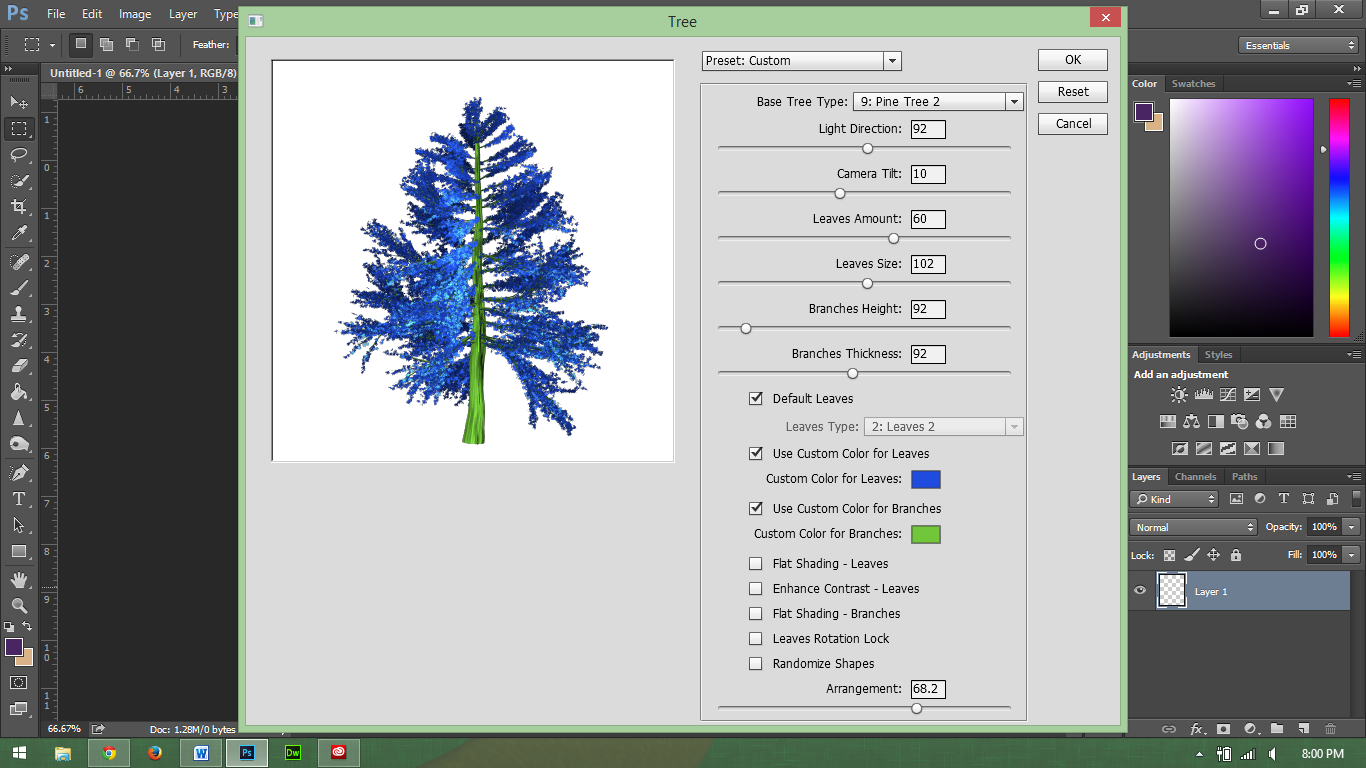 |
| Who doesn't want to create a blue tree? |
The current Photoshop CC (2014) brings many new features to
the table not included in previous
releases, including the ability to render
flames and trees. While I don’t use these two tools regularly, I do find that
Photoshop is perhaps one of the easiest and most useful photo editors to use
and learn.
I realize that I say this having years of experience using
the product but it is true. Having a basic knowledge of Photoshop will allow
someone to edit a picture, a more advance knowledge will allow someone to further
manipulate images and create original pieces of art that don’t even start with
images.
In addition, much of the layout for Photoshop is similar to
other adobe tools such as InDesign and Illustrator, although I do not claim to
be an expert at using these tools; however, I do find their interface familiar
with my limited experience.
Photoshop can be used to manipulate an image; I find that I
like to use it in creating original works of art. Just recently, I used it to
create this video covering the profession of being a librarian. I am new to
making characters, but with my knowledge of Photoshop, it makes it a bit
easier. For someone who is not good at drawing, this is actually simple and
fun.
For those who are not familiar with Photoshop, I would
highly recommend learning how to use this, Adobe offers some basic instruction
online. Also you should be able to find a class in your community on the
product.
The one negative side to Photoshop CC is the cost. For most
individuals creative cloud will cost anywhere from $119 - $359 per year
depending on the package you buy. Some employees and university students can
probably get the program at a discount through their school or employer. Also,
Adobe does give discounts on its products for students (see: https://creative.adobe.com/plans).
Besides the price, Photoshop is a tool that I would
recommend that everyone at least try using. Besides my personal use, I have
also found it helpful to know Photoshop for job security reasons. Since I am
familiar with this technology, I am able to help others learn this software and
use it to complete projects.
Saturday, September 20, 2014
Remember the Pager?
 |
| The LG G Watch. |
Smartwatches are not a new thing. In fact, the first one I
remember hearing about was the Timex Fossil Wrist PDA. You also had the Microsoft
SPOT watch, which received information over FM frequencies.
While the idea isn’t new the concept has been getting a lot of
press attention lately. With Google’s Android Wear just released a couple of
months ago I decided to try an LG G Watch.
The G Watch definitely has some power to it. It comes with a
1.2 GHZ processor as well as 4GB of Storage. For those who don’t speak tech that
means it has the same stats as a cheap Android Phone. It doesn’t have Wi-Fi or cellular
service on its own. Instead it connects to your phone via Bluetooth (Requires Android 4.4 or
newer) and gets its data from there.
This brings up my one major complaint about this device.
With the amount of power that it has, all it does is give you notifications
from your phone. Sure, it is nice to read your text messages and emails as well
as see map directions on your watch but why have such a powerful device do
this? This device could be doing so much more. It has the power but it falls
short. Also for $229 this is an expensive notification device. If the price
came down to about $100 I would say that it is worth it.
Let’s go over some of the aspects of the watch in more
detail.
The Display is quite nice on the device. You would be surprised
how easy it is to read most emails on a 1 by 1.5 inch display. The display is
easy to see. The one exception to this might be if you are in direct sunlight.
However, since I work inside most of the day I haven’t seen this as a problem.
 |
| The color screen works well indoors |
The device has no knobs or any physical buttons for that
matter. Everything is done with a touch screen. It also uses a wireless charger
for power. One of the major complaints I have heard about the watch is the
battery life. While it is true that most watches have batteries that last for
at least five years before being replaced; I have not had any problems with the
watch dying on me. In most cases, the watch will still have about 60percent
left when I take it off at night. That is after being used all day. Even when
the navigation had been used and I had it on for about 18 hours, it still had
plenty of life left.
Along with using the touch screen, you can also interact with
the device by talking to it. This works the same as Google Now where you say “OK
Google” and then give your command. This works OK for text messaging. For the
most part this is only useful in controlling your phone. You can tell the watch
to open a certain app or website on your phone and it will do it. I don’t
really see the point in this though since I could just as easily type in the
Web address or open the app on my phone.
Ultimately, all the watch is just an extension of Google Now
and your phone notifications. I guess it gives us an excuse to be a bit lazier,
now we don’t even have to reach for our phones. The nice thing is that it does
vibrate on your wrist instead of in your pocket or desk. This makes it easier
to know when you have a notification.
You can also control your phone camera with the watch.
Although I haven’t done this yet I could easily see how this would be helpful
in taking group pictures or selfies from a distance. Other than giving notifications,
the watch doesn’t do much. I am hoping that they change this in the future, as
there is a lot of potential here.
Another downside for some might be the width of the watch
the watch is probably about twice the width of a regular watch. This might be OK
if it had a rounded screen but it doesn’t. This makes some awkward space on the
sides of the watch where you can see light going through. After using the watch
for a week this doesn’t bother me but I am hoping that later itineration of the
device will be thinner.
 |
| The Watch is probably about 1.5 CM in width |
At its current cost of $229 the LG G Watch is not really worth
the cost. Yes, I have enjoyed having this device and I can see potential for growth,
but I don’t think the technology is quite there yet. If the device ever comes
down to about $100 then it might be worth it, but for most people I would tell
them to wait at least a year or two for the devices to get more functionality
and fashion. On the other side, this device could be exactly like the pager?
Remember, those notifications devices from the 1990s? They were replaced by
cell phones because the phone had more usability.
Wednesday, April 2, 2014
Day One - journal app

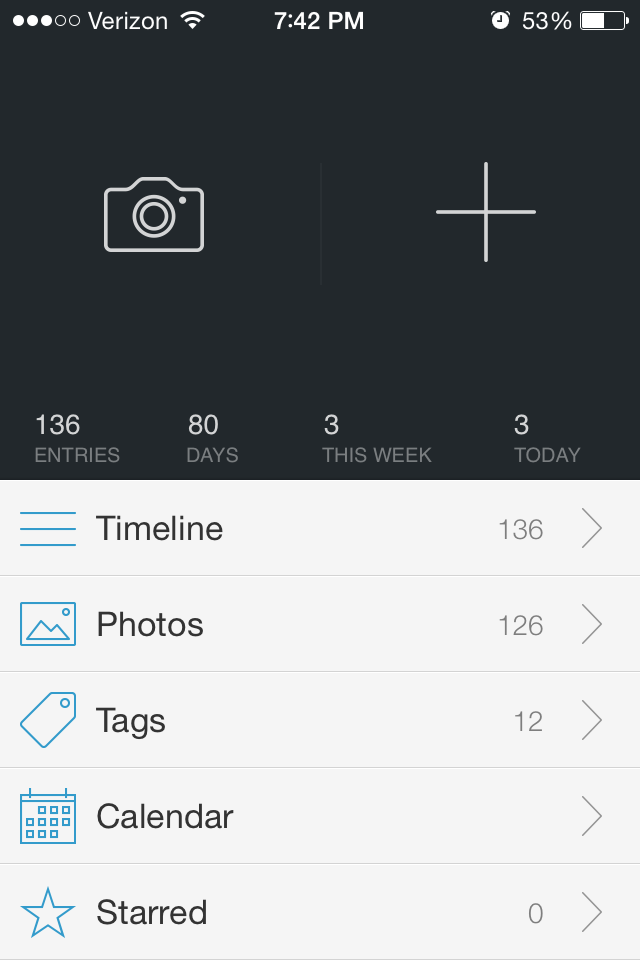 |
| Main menu |
I have and am reviewing the iPhone version of Day One, but I assume the Mac version is very similar (unfortunately, there is no Android version I am aware of yet, but similar apps exist for Android). The interface is simple and does everything I would want it to do plus a little more. The goal of the design team was to make keeping a journal as simple as tweeting or text messaging, I think they have done a good job, especially considering the app costs about the same as a nice hardbound journal ($4.99).
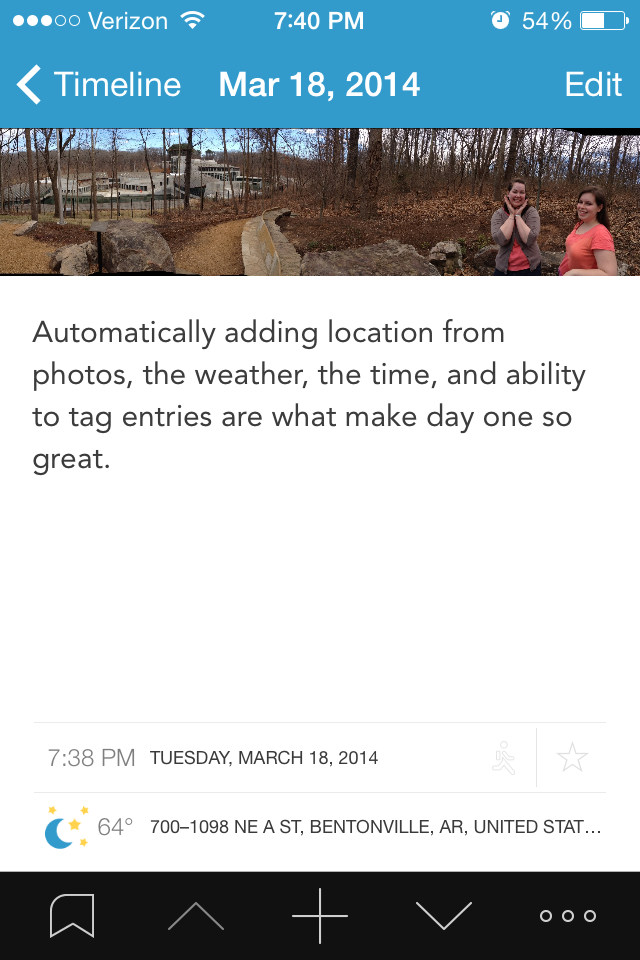 |
| Journal entry view |
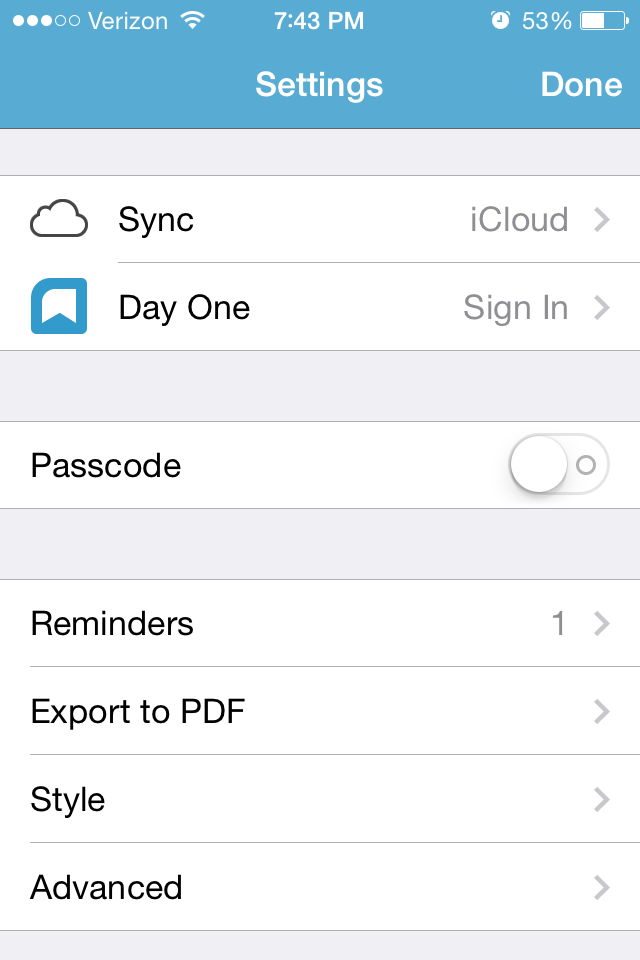 Now, the all important export and saving features. What good is a journal on my phone if I can't put it somewhere in a permanent format (AKA printed)? What if I want to send it to a someone else, or what if my phone crashes? All of the data can be backed up to the icloud or dropBox. The app can export your entry(ies) as a .pdf or send it straight to the e-mail app with the photo as an attachment. A very useful feature is exporting only entries with specific tags. For example, lets say I just had a baby and some of my entries are about her. I can tag those (very easily), and export only those as a pdf, then send it to family members. A new ("publish") feature lets users publish a mini-webpage with the journal entry, and allow it to be shared to whomever they wish.
Cons: The app only lets you attach one photo per entry. This isn't too big of a deal because I can just make another entry right after it. When scrolling through entries, the top and bottom quarters of photos are cut off (to make more room for the text?). The photo can be viewed full screen with a simple click, but I would still rather see it all there. The top often has faces in it, so the photo I see when scrolling is a bunch of headless folks. When iOS gets updated, entries may disappear. The help guide lists a few ways to get them back, which worked for me.
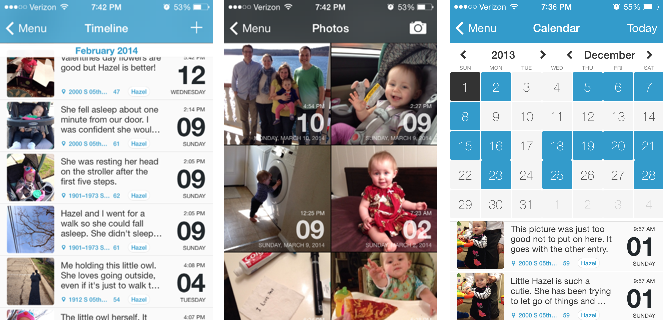 |
| Three primary ways to view entries. Timeline, photo, and calendar. |
*I actually got this for free from the iTunes store anniversary, this is the best app of the bunch in my opinion (its the only one I actually use).
Sunday, November 17, 2013
Little Inferno
Little inferno is a very strange fireplace simulation game that is more about being a pyro than anything else. It has a very dark sense of humor. At the same time, it also is a good game to relieve stress. Especially for those of us who liked to burn stuff up in the fireplace as a kid.
The game will set you back $10. If you enjoy weird games and burning stuff up I highly recommend it. The below video is perhaps the best description I can give it.
Monday, October 21, 2013
Has it aged well? Monster Bash
 |
| Who doesn't like an intro with a green Zombie? |
Compared to my last review Monster Bash is a plat-former that
has stood the test of time quite well. Unlike
Jazz Jackrabbit this game is more about solving puzzles than speed. While the first three levels are quite easy,
level 4 takes the difficulty level up a couple of notches.
For this review, I only looked at the shareware version of
this game. This version includes part 1
of 3.
For those who have not played this game before, the main
point of this game is to free all the captured dogs and cats throughout the
level. In some cases the animals are
hidden, while in other cases they are in plain sight.
Overall this game is still fun to play and includes many
challenges to keep both adults and children entertained. I recommend you download the game today from
3D Realms and play it for Halloween 9/10 Skeleton Hamsters.
In order to play this game you will need an MS-DOS emulator
such as DOS box.
Monday, October 14, 2013
Has it aged well? Jazz Jackrabbit Holiday Hare
 |
| What is that red flying thing? An angel? or an Angel daemon. |
As a kit who grew up only playing PC games, Jazz Jackrabbit
was perhaps one of the best DOS games there was besides Hocus Pocus and Raptors:
Call of the Shadows. I remember playing
the shareware versions of all of these games over and over again. As a kid these were really fun games.
I have replayed a few of these games as I have gotten older,
some games such as Hocus Pocus are alright, however Jazz Jackrabbit Holiday
Hare really has not aged all that well.
Looking at the screenshot above you can see that the graphics are
alright. However, the controls are what
really makes this game loose its playability.
You move way to fast and you are bound to run into multiple bad guys
before the end of the level.
I really have nothing against a green rabbit with a gun, or
the artistic style. Considering the time
this game looks quite good. But if you
try and play this game even on easy, you will die. Not because the game is hard but because the
screen does not give you enough space to see ahead.
Overall as this game looks alright but hasn't aged well I
give it 6/10 tomatillos.
Monday, March 25, 2013
Banks vs. Credit Unions
Banks are not all that bad but let’s face it; there is a
difference between non-profit organizations and for-profit organizations. So when it comes to credit unions vs. banks I
am not an expert however, I can tell you about my experience going to a credit
union.
After moving recently and becoming employed by an
organization that supports a credit union I have decided to give it a try. After going to a local bank here that we
really haven’t used in a long time and getting our money withdrawn we went down
to the local credit union. While all
financial institutions are different the experience was fast and very
convenient.
The thing that surprised me the most is the fact that the
credit union printed out our debit cards right there on the spot. So Instead of having to wait for weeks on end
before we are able to access our account we have our Debit cards right away and
have access to our money.
Along with this for all of my life I have used local
banks. I really enjoy the great customer
service I have received at these banks.
It was always nice to go into the bank and have one of the tellers ask
how my parents in Guam were doing.
However, when we moved it became next to impossible to use a local bank
as we have no way to deposit checks.
This problem is solved with a credit union. With connections nationwide no matter where
we go we will be able to use free ATMs and also deposit checks. This makes life easier.
Overall you have to ask yourself where do I want to place my
money? Banks do have some advantages but
as recent media coverage has shown us, in the end many banks care more about
making money than they do about good customer service. Every financial institution is different as
such a non-profit organization like a credit union may work best for you.
If you want a good comparison check out this infograph
Monday, February 25, 2013
First Contact with Owd Bob
 |
| The Warp drive was invented by a Sheep Herder |
I’ll be honest. I am
not someone who regularly watches family themed moves however, when I saw that
two characters from Star Trek were the starts of Owd Bob it got my
attention. Owd Bob is the story of a
grandfather (played by Zefram
Cochrane) and his grandson.
The Grandfather is a sheep herder on the Isle of Man. Basically he is a really angry old man. After his parents die David, the grandson
comes to live with his grandfather. Throughout
the movie David is befriended by his grandfather’s neighbor (played Miles O’Brein)
and his daughter. I am not really sure
what the plot of this movie is but there is a dog named Zach and another dog
named Owd Bob. Owd Bob really doesn’t come
into this movie much but I guess it is a cool name and caught people’s
attention.
Owd Bob is based off a book which I haven’t read, however
having not read the book this is a pretty good family movie. In one way it reminds me of Old Yeller set on
the Isle of Man. In another way it
reminds me of Babe although Babe never ate sheep.
Although this movie is not Star Trek, the fact that it has
two characters that played is Star Trek was the reason why I watched it. Even without this feature if you like a movie
that is family friendly, about dogs that not only heard sheep but also kill
them, has a somewhat confusing plot and you have a Netflix account this movie is
worth watching.
Saturday, February 9, 2013
ISP High Speed VS Good Customer Service What is More Important?
Internet Service providers are interesting. In some areas there will be dozens of
providers of high speed internet in others there will be next to none. Growing up in a rural area we got cable
internet when I was about 13 years old.
In those early days we had @home service through AT&T. After a while @home went away and then ever
since we have had Comcast internet service.
The nice thing about Comcast is that generally they have a stable
connection and they also are able to give you 20MBPS versus 3MBPS with Century
Link in the same rural area. While most
people do not need a connection faster than 3MBPS it is sometimes nice to have especially
when one likes to design websites.
In most urban areas all ISP’s have similar connection speeds
and various packages available however over time I have learned that customer
service makes a drastic difference when choosing an internet service or any
other service for that matter.
I have one experience working with customer service for
Century Link while hooking up a network for a family friend. Their service people are quick, reliable and
were able to solve the connection problems very quickly. I don’t know what they did but in a matter of
minutes all problems were resolved. I
cannot say from ongoing experience how they are however I have had lots of
experience with Comcast.
Comcast is a great dilemma to me, I enjoy the fact that
their internet has higher speeds however, they make it easier to discontinue
service than it is to get it set up. After
my parents left for Guam it was necessary to get their internet and phone
service switched over to our names. We
already had the equipment however, for some reason Comcast would not allow us
to just switch the service over, instead it was necessary to call them, go in
and visit their store, and even get a different phone number than the one my
family had used for the past 14 years.
After visiting the store, it took two days to get service up and running
because for some reason I needed to have and FCC pin which I was not able to receive
online. Through this experience I found
out two things.
1. Comcast service over the phone for creating a
new connection does little good. They
say they are busy and that if you do such and such they will call you back when
are available. They never called back.
2. Comcast
IM service works really well however, throughout the process they will feed you
advertisements and try and get you to buy services you do not really want.
Despite these setbacks my recent experience has been better
than my previous mentioned learning experience.
Moving to Utah, I decided to have one of their service people come and
set up our internet service. Although I
had the same experience as before with the IM service trying to sell me stuff I
really didn’t want (which made it take about twice as long to get through the process)
it was easy set up and worked out quite well.
One the flip side as part of moving we got rid of our phone
service. To do this I called
Comcast. What is interesting is that
unlike setting up a new service it is extremely easy to get rid of
service. Not only is it easy but its
quick and simple.
Overall I am not a fan of Comcast customer service however; they
are reminder to me of why I need to provide good customer service. The other issue is truly deciding what is
important to me meaning a fast internet connection over poor customer service.
Thursday, January 17, 2013
The Children of Hurin
 J.R.R.
Tolkien’s greatest known work is the Lord of the Rings Trilogy. While this work is know all around the world
it is also probably one of my least favorite works by Tolkien. Along with the Lord of the Rings the Hobbit
and the Silmarillion Tolkien wrote many other shorter works and poems. While most of these stories like the Children
of Hurin were published after Tolkien’s death they also represent some of his
greatest work.
J.R.R.
Tolkien’s greatest known work is the Lord of the Rings Trilogy. While this work is know all around the world
it is also probably one of my least favorite works by Tolkien. Along with the Lord of the Rings the Hobbit
and the Silmarillion Tolkien wrote many other shorter works and poems. While most of these stories like the Children
of Hurin were published after Tolkien’s death they also represent some of his
greatest work.
Expanding on
the story of Turin Turambar found in the Silmarillion; the Children of Hurin is
the story of the adventures and misadventures of Turin. As the title suggests
Turin is the son of Hurin, who was once a ruler of men in the first age of
middle earth. Hurin is captured in
battle by Morgoth (for all practical purposes this is the devil of Tolkien’s
fiction before Sauron) who curses Hurin and his family.
In a sense
this story is very reminiscent of the tale of Oedipus Rex. While the tale is a tragedy it is well
written, and interesting. Unlike the
Lord of the Rings this tale is very fast moving and as the appendix states is
probably the pinnacle of J.R.R. Tolkien’s work.
This work is not as light hearted as the Hobbit however for anyone
interested in classic British literature or any fans of Tolkien’s mythology
this is perhaps one of his best works.
Sunday, December 30, 2012
The Hobbit Part 1
 |
| The Hobbit Part 1 by Legendary Frog (picture is Property of Legendary Frog) |
The Hobbit Part 1 is a flash short from about 5 or so years
ago. It was one of Legendary Frog’s last
projects before starting Toonwerks. The
hobbit part 1 is a comedic movie that is about a Hobbit Bilbo Baggins who like
other hobbits likes to smoke Pipe Weed.
It parodies the book the Hobbit very well and makes fun of its
shortcomings like the fact that Golem and Bilbo play a strange game of riddles
where if Golem wins he gets to eat Bilbo.
The video is worth the 10 minutes of your time it will take to watch it
however it only covers half of the book and ends in the middle of Bilbo and
Golem’s game of Riddles.
In a similar sense The Hobbit an Unexpected Journey covers
the Journey of Bilbo Baggins about 2/3 through the book (basically up to Mirkwood)
it is a well-made movie with lots of
action, humor, and follows closely to Tolkien’s original story. Unlike most movies this movie has extra
characters and parts added. While some
would find this annoying I would say that it only adds to the movie as Peter
Jackson tries to make the movie not only the story of 13 dwarves and Bilbo Baggins
but also a prequel to the Lord of the Rings series. In addition to the book there is a white orc
in the movie and also the character Radaghast the Brown makes a few appearances
but instead of distracting from the main story the added portions make sense
for the most part and add to the story line.
Overall if they were to have made the Hobbit into a one-part movie that
was as good as this first part of three it would have had to have been at least
a 5 hour movie so the Hobbit an Unexpected Journey as an Unexpectly good movie
and is well worth your time.
Sunday, December 16, 2012
Mazda 3

Shopping for a new car can be a hassle. Dealing with Salesmen, reviews and opinions
can cause quite a big hassle. There are
some good resources and everyone has an opinion about what car to buy and who
to get it from. This review isn’t about
buying a car however, if I get enough requests I could write a review on that
in the future. Instead this is a review
of the 2012 Mazda 3 i touring with Skyactive technology.
Perhaps the biggest selling point of the Mazda 3 is the available
Skyactive technology. There is a lot that
goes into this technology however suffice it to say the car is lighter and
averages about 36MPG according to its onboard dash. (See http://www.mazda.com/mazdaspirit/skyactiv/
for more information). The car gets this
mileage using new engine technology which makes it more efficient without a
hybrid engine.
While the exterior of the car is sporty what really matters
the most is the interior. The Mazda 3
comes with what seems to be a high quality cloth material. While it may not have the greatest technology
it is easy and fun to drive. There are
controls on the steering wheel for radio, and Bluetooth and space for optional
navigation. One of the biggest supposed
downsides to the Mazda 3 is the legroom for the backseat. While this may be a problem for some the car
seems to offer a better interior, and more legroom in the back than the highly
popular Toyota Corolla. There is some
road noise but it is not to the point of being bothersome.
While everyone has different tastes for vehicles the Mazda 3
is fun to drive, gets excellent gas mileage and is an overall great car. If anything the one downside is that the car
does not come with built a built in USB port for MP3 players (the 2013 model
does have this feature though). However
I have not found this to be a problem because one can simply play music over the
Bluetooth system.
For anyone in the market for a midsized sedan I highly
recommend considering the Mazda 3. While
it may not be the best car in its class according to reviews the people at
Mazda took great car to create a good car that gives the competition a good run
for its money.
Friday, November 30, 2012
Online Resources
This week I am going to review some resources available
online. Most of the below resources
require a subscription so go to your library and check them out. I have tried to highlight databases/ features
that not many people are familiar with. Do
you have a favorite database? Share it
in the comments below.
As many people know most libraries have online databases available
for use by their patrons. However, these
databases are not widely used in many cases because people don’t know what they
have to offer.
For instance did you know that many library systems will
allow you to download music for free?
Some libraries subscribe to a service called Freegal which allows
individuals to download three songs per week for free. Some of the artists in their selection
include former American idol winners, popular groups like Train and also YouTube
artists like the Piano Guys. Not only
can you use this on your computer but you can also use it on any android or ios
phone. Note that while Freegal is a new service and did have a rocky start they are growing their selection rapidly and while they don't have all the music you may like to listen to they have a lot and are worth looking into if they are available at your library.
Most individuals who went to college are in some sense
familiar with EBSCO host; however one feature that most people are not familiar
with is the visual search function. Visual
search is fairly new to EBSCO however it is immensely helpful in finding
quality resource. While a regular search
will give you quantity visual search allows the individual to break their
search down using keywords that they may have not thought of previously.
While more common in a college library another favorite
database is Natural Standard. This database
has lots of pieces of information about different dietary supplements, including
research information, usages, and drug facts.
While it is hard to find it in a public library I would highly recommend
this website for anyone who is interested in essential oils and their effectiveness
and proven by doctors and scientists.
The above databases are available only with a subscription
which in many cases a library will have however, there are also many free tools
available as well:
Are you looking for a book?
Do you like to read classics? Project Gutenberg has lots of classic books that are in the public
domain. The public domain is a term used
to describe books where the copyright on the book has expired and so it is now available
to any individual for free. There are
thousands if not millions of free books available on project Gutenberg as well
as in the Google play store.
Thursday, November 8, 2012
What do you get when you cross all the good parts of the Hunger Games, Inheritance Saga?

Pathfinder center's around one year in the life of Rigg who is a young boy from a small community in a larger empire. Rigg has the special ability to view the paths of animals and individuals. Rigg's fathers last request is for him to go meet up with his sister in the empire's capital city. With this instruction and his inheritance Rigg sets out on an adventure not only to the capital city but also through time itself.
One of the more interesting points in this novel is the time travel that happens. instead of focusing on the problems that time Paradoxes create and many other Science Fiction time travel novels/ movies to Pathfinder embraces those to show how small or large parts of the future can be changed. The book also embraces the idea of inherited magical abilities with all of the main characters having a unique "magical" ability.
Another likable point about this book is the introductions at the beginning of every chapter that explain the founding of the planet garden. the adventures and mystery surrounding the colonization of garden are not only intriguing but also interesting and easy to follow.
As the introduction hints at I would recommend this book to anyone who is a fan of Young Adult Science Fiction/ Fantasy. Plus it is a much more interesting read than the books mentioned in the title of this review as it cuts out a lot of the unnecessary travel dialog or monologue that they have. I give this book an overall rating of 8/10.
Wednesday, October 31, 2012
Windows 8
Previously I have reviewed the Release Preview version of Windows 8 however this review is for the full, actual version of the operating system, and might repeat some stuff stated in the previous review.
To make mention I will not be writing much about the security upgrades to Windows 8 they are present and useful however, they run behind the scenes and have not been visible my last week of using the OS.
 To move on first I will mention that similar to early versions of windows there is a duality of Operating systems as Microsoft moves from the common desktop to their new UI there are lots of changes and lots of confusion, similar to how early versions of windows relied on MS-DOS as part of their code and in order to run many programs.
Because of this factor I am separating this review into a review of the desktop and then a review of the new UI. but first I will review some general changes.
CHANGES
If you install Windows 8 from 7 one of the first things that you will notice is how the OS does not want to use all your software that is "system built" on my Samsung laptop this means all the volume and screen brightness control software that came pre-installed had to be uninstalled. This however, is not a problem because Windows 8 has all of this software built into its system which means better use of hardware resources.
Another noticeable improvement came while I was playing Skyrim on the new OS. often times while playing this game on Windows 7 my laptop would get extremely hot up towards the fan vent, and while it will get warm using 8 the computer does not seem to run near as hot.
THE DESKTOP
The "Desktop is not a new idea, and has really not changed since windows 95, sure the graphics have gotten better but the overall design has stayed the same. Windows 8 gets rid of the "Aero" graphics that bogged down windows Vista and 7 and has instead gone to a more basic layout without the 3D effects that the previous operating systems had because of this it runs using less memory.
 One important thing missing from the desktop as can be seen from this picture is the presence of a start button. Instead of using these buttons Windows 8 relies on your putting your mouse in different corners to get different effects. This can at times be obnoxious as the OS does not seem to sense the corners immediately or if you are trying to exit out of a window and the charms bar comes up.
Other than the aesthetics and lack of start menu it would be very difficult to tell the difference between Windows 7 and 8 by looking at the desktop.
THE NEW UI (METRO OR START MENU)
The most radical change with windows 8 is the introduction of the new start menu and while the desktop and start menu work in conjunction with one another they are also very independent of each other. In a sense newer applications will run in the start menu while older applications or apps without a new UI interface will run on the desktop.
 When you first load windows 8 it will come with lots of smart tiles that will automatically update for things like news, E-mail and Calendar. for anyone who uses Microsoft applications for such things these tiles would be very handy however being that I am more Google oriented using Gmail and Google Calendar the smart tiles seemed to have little use to me so i removed them from the start menu.
Although the new UI is not perfect it does have some nice features. for example all programs run in the it run full screen. by moving the mouse to the upper left corner you are able to switch between applications however I see no way to close the apps while you are in them other than switching out of them and then right clicking to close them.
Despite the minor annoyance the applications I have used look really nice and function better or the same as an application would on the desktop. the main problem is that the Microsoft app store does not have many apps available compared to Google Play or legacy apps that will run on the desktop.
Just to mention on of the major annoyances to me with the start menu on the release preview was that I could not scroll across the menu using the scroll button on my mouse, however this feature has been fixed in this version. this makes the new OS manageable and sometimes even fun to use.
Another interesting point is that switching between the desktop and the start menu or visa verse is almost instantaneous. Similar to loading a program I expected the new OS to have problems with lagging while changing the screens.
Overall after getting rid of all the junk that came pre-installed on the computer I was easily able to adapt to the new OS
CHARMS BAR
 One other difference that I will mention here is the charms bar. similar to being able to search for programs using the start bar in windows 7 the charms bar allows you to search for programs on your computer and in the windows store however you do not have to bring it up just in the start menu, by dragging to either of the right hand corners the bar will come up.
Along with allowing you the search the bar also has social media options and settings options.
As can be seen in the picture the Charms bar is simple designed however as stated above will sometimes come up when you go to close a program.
LEARNING CURVE AND IS IT WORTH IT?
Over the past couple months the press has really pointed out that there is a steep learning curve for Windows 8. While this may be true for those who are not "computer literate" the differences in Windows 8 are easy to adapt to and the learning curve is really not as steep as they make it out to be. the only real differences which are outlined above make sense and while some of annoying most make sense and will easily have future benefits for customers.
Until January 2013 you can buy Windows 8 pro upgrade for $40 as stated in a previous post I stated that this is a good deal especially for those with Windows Vista and XP and I still hold to this ideal however, I might also add that with the performance and security upgrades included with Windows 8 even if you are not set on the new start menu it is well worth the $40 upgrade price. This new OS is sleek user friendly and functional and I would highly recommend that those considering it at least take the time to test it out it put it on their computer. Updating from windows 7 was seamless and all of my settings, saved games and documents were carried over seamlessly.
To make mention I will not be writing much about the security upgrades to Windows 8 they are present and useful however, they run behind the scenes and have not been visible my last week of using the OS.

Because of this factor I am separating this review into a review of the desktop and then a review of the new UI. but first I will review some general changes.
CHANGES
If you install Windows 8 from 7 one of the first things that you will notice is how the OS does not want to use all your software that is "system built" on my Samsung laptop this means all the volume and screen brightness control software that came pre-installed had to be uninstalled. This however, is not a problem because Windows 8 has all of this software built into its system which means better use of hardware resources.
Another noticeable improvement came while I was playing Skyrim on the new OS. often times while playing this game on Windows 7 my laptop would get extremely hot up towards the fan vent, and while it will get warm using 8 the computer does not seem to run near as hot.
THE DESKTOP
The "Desktop is not a new idea, and has really not changed since windows 95, sure the graphics have gotten better but the overall design has stayed the same. Windows 8 gets rid of the "Aero" graphics that bogged down windows Vista and 7 and has instead gone to a more basic layout without the 3D effects that the previous operating systems had because of this it runs using less memory.

Other than the aesthetics and lack of start menu it would be very difficult to tell the difference between Windows 7 and 8 by looking at the desktop.
THE NEW UI (METRO OR START MENU)
The most radical change with windows 8 is the introduction of the new start menu and while the desktop and start menu work in conjunction with one another they are also very independent of each other. In a sense newer applications will run in the start menu while older applications or apps without a new UI interface will run on the desktop.

Although the new UI is not perfect it does have some nice features. for example all programs run in the it run full screen. by moving the mouse to the upper left corner you are able to switch between applications however I see no way to close the apps while you are in them other than switching out of them and then right clicking to close them.
 |
| Skype in the new UI |
Despite the minor annoyance the applications I have used look really nice and function better or the same as an application would on the desktop. the main problem is that the Microsoft app store does not have many apps available compared to Google Play or legacy apps that will run on the desktop.
 |
| Skype on the Desktop |
Another interesting point is that switching between the desktop and the start menu or visa verse is almost instantaneous. Similar to loading a program I expected the new OS to have problems with lagging while changing the screens.
Overall after getting rid of all the junk that came pre-installed on the computer I was easily able to adapt to the new OS
CHARMS BAR
 One other difference that I will mention here is the charms bar. similar to being able to search for programs using the start bar in windows 7 the charms bar allows you to search for programs on your computer and in the windows store however you do not have to bring it up just in the start menu, by dragging to either of the right hand corners the bar will come up.
Along with allowing you the search the bar also has social media options and settings options.
As can be seen in the picture the Charms bar is simple designed however as stated above will sometimes come up when you go to close a program.
LEARNING CURVE AND IS IT WORTH IT?
Over the past couple months the press has really pointed out that there is a steep learning curve for Windows 8. While this may be true for those who are not "computer literate" the differences in Windows 8 are easy to adapt to and the learning curve is really not as steep as they make it out to be. the only real differences which are outlined above make sense and while some of annoying most make sense and will easily have future benefits for customers.
Until January 2013 you can buy Windows 8 pro upgrade for $40 as stated in a previous post I stated that this is a good deal especially for those with Windows Vista and XP and I still hold to this ideal however, I might also add that with the performance and security upgrades included with Windows 8 even if you are not set on the new start menu it is well worth the $40 upgrade price. This new OS is sleek user friendly and functional and I would highly recommend that those considering it at least take the time to test it out it put it on their computer. Updating from windows 7 was seamless and all of my settings, saved games and documents were carried over seamlessly.
Sunday, August 12, 2012
The Nexus
If any of you out there are Trekkie's you know that the Nexus is a place where all your wildest dreams come true and the only limit is yourself. Although that place seems like a fun waste of time this review is on the Nexus 7 created by Google and Asus.
For those who are not familiar with the Nexus 7 it is the latest 7 inch tablet created to compete in the field. Although the Amazon Fire might be sweet the Nexus 7 blows its competition out of the water, with its faster processor, major support from Google and pure and clean Jelly Bean Android operating system.
Jelly Bean
First off I have never used Android Ice Cream Sandwich, although I have use older versions like Gingerbread, Jelly Bean is drastically different than previous versions of android. This is a good thing, the OS seems much more refined and easier to use, at the same time it seems like some of the customization that came with the older OS (the roughness around the edges) is gone. Also realize that the Nexus 7 is pure android meaning that it does not have any preloaded software from companies like Samsung on it, so some of the features like the stock keyboard are defiantly not refined. Overall Jelly Bean is an excellent OS but the Nexus 7 is probably not for the individual who wants the easy and quick environment that comes with the Kindle Fire, or Nook Tablet. However, one of the main reasons I bought the Nexus 7 was to have more freedom in choosing e-books. As such I currently E-book apps for Google Books, B & N Nook and Deseret Books which you would not be able to get on an amazon kindle or nook.
Games on the Nexus
As an introductory offer Google is offering many freebies when you buy an Nexus 7 one of these includes $25 to spend in the Google Play Store, as such I decided to check out some of their games, although most look lame I settled on World of Goo and Osmos.
Both of these games are available for PC however, after playing World of Goo on both I can say that the nice HD screen and the ability to use your fingers adds a nice touch to this game where you build towers and bridges out of Goo. Even if you have played these games on the PC or Mac I would recommend you try them for a tablet as they are quite fun, and with its excellent hardware, the Nexus 7 is a good choice.
E-Reader
As stated above the I mainly got the Nexus 7 to work as a more advanced e-reader. Lets face the facts with the advent of e-books not every service has everything. As such I wanted to be able to access more books on one device.
As an E-reader the Nexus works quite well, the screen is able to automatically brighten or dim depending on what kind of lighting you are in, it also has some nice transition images when you are turning a page using the Google books app or the Nook app. overall in this area it works just as expected and I really have no complaints. Plus it also has a good battery so if all you are doing is reading books with it you could probably go for a week or two on one battery charge.
Weaknesses
Just like the Nexus in Star Trek: Generations, this Nexus is not perfect, no the problem isn't that it gives you a false sense of security and leads you into wasting time in a surreal world, instead the problem is in the corners that were cut in creating the product.
Unlike many tablets a major complaint about the Nexus 7 is that it has not SD slot for storage expansion, However, I am not a big app guy so this doesn't bother me to much but if I did download a lot of apps then this could be a problem as 8GB or 16GB would not be enough.
I have also heard that some of the systems shipping have had issues, although this is not a major problem that I have faced it is something to be aware of. As such I recommend studying others opinions about the Nexus 7 in making the decision to purchase one.
Despite the weaknesses you CANNOT find a better tablet for $199 or $250 and the Nexus 7 is a great buy for anyone who is look for a handy small form factor tablet.
For those who are not familiar with the Nexus 7 it is the latest 7 inch tablet created to compete in the field. Although the Amazon Fire might be sweet the Nexus 7 blows its competition out of the water, with its faster processor, major support from Google and pure and clean Jelly Bean Android operating system.
Jelly Bean
 |
| Nexus 7 Home screen |
Games on the Nexus
As an introductory offer Google is offering many freebies when you buy an Nexus 7 one of these includes $25 to spend in the Google Play Store, as such I decided to check out some of their games, although most look lame I settled on World of Goo and Osmos.
 |
| World of Goo |
E-Reader
As stated above the I mainly got the Nexus 7 to work as a more advanced e-reader. Lets face the facts with the advent of e-books not every service has everything. As such I wanted to be able to access more books on one device.
As an E-reader the Nexus works quite well, the screen is able to automatically brighten or dim depending on what kind of lighting you are in, it also has some nice transition images when you are turning a page using the Google books app or the Nook app. overall in this area it works just as expected and I really have no complaints. Plus it also has a good battery so if all you are doing is reading books with it you could probably go for a week or two on one battery charge.
Weaknesses
Just like the Nexus in Star Trek: Generations, this Nexus is not perfect, no the problem isn't that it gives you a false sense of security and leads you into wasting time in a surreal world, instead the problem is in the corners that were cut in creating the product.
 |
| Roughing it By Mark Twain |
I have also heard that some of the systems shipping have had issues, although this is not a major problem that I have faced it is something to be aware of. As such I recommend studying others opinions about the Nexus 7 in making the decision to purchase one.
Despite the weaknesses you CANNOT find a better tablet for $199 or $250 and the Nexus 7 is a great buy for anyone who is look for a handy small form factor tablet.
Thursday, August 2, 2012
California zephyr , Amtrack Superliner
 Riding coach on the Zephyr is somewhere between a cheap seat
on an airplane and a cruise. The train (#6 anyway) had 1 engine, 3 coach cars,
1 observation car, 1 dining car, and 2 sleepers (in that order).
Riding coach on the Zephyr is somewhere between a cheap seat
on an airplane and a cruise. The train (#6 anyway) had 1 engine, 3 coach cars,
1 observation car, 1 dining car, and 2 sleepers (in that order). Coach Seats
 Most coach seats are on the second level, the bottom has a
couple seats reserved for those who cannot go upstairs, the reminder is full of
restrooms. You get large reclining seats with both a short (thigh length)
attached leg rest, and a foot rest that is attached to the chair in front of
you. The foot rest has 2 positions, low and just right, the attached leg rest
can stop anywhere you like, though I found they work best together. The seats
did not recline nearly enough for me, but it’s better than nothing. The chairs,
like more airliners, come equipped with a small dining tray that slides to you.
It was about 6 inches short of being at a comfortable eating position for me. Plenty of room for medium and smaller baggage
is supplied above seats, and a limited amount for large bags is downstairs,
though it is not locked and no one is there to stop the first people on from
taking up all the limited room.
Most coach seats are on the second level, the bottom has a
couple seats reserved for those who cannot go upstairs, the reminder is full of
restrooms. You get large reclining seats with both a short (thigh length)
attached leg rest, and a foot rest that is attached to the chair in front of
you. The foot rest has 2 positions, low and just right, the attached leg rest
can stop anywhere you like, though I found they work best together. The seats
did not recline nearly enough for me, but it’s better than nothing. The chairs,
like more airliners, come equipped with a small dining tray that slides to you.
It was about 6 inches short of being at a comfortable eating position for me. Plenty of room for medium and smaller baggage
is supplied above seats, and a limited amount for large bags is downstairs,
though it is not locked and no one is there to stop the first people on from
taking up all the limited room. The View
 The observation deck (limited to the top floor) is lined
with paneled windows that coat the entire side curve onto the ceiling. This
makes for a bright room with great views. Half the car has 2 and 3 person
benches facing the windows; the other half is 4 person booths with tables,
which are ideal for snacking and board game playing. The viewing benches are
smaller, with no head rests, and foot room can be a bit cramped, but they are a
nice change after sleeping in a recliner all night.
The observation deck (limited to the top floor) is lined
with paneled windows that coat the entire side curve onto the ceiling. This
makes for a bright room with great views. Half the car has 2 and 3 person
benches facing the windows; the other half is 4 person booths with tables,
which are ideal for snacking and board game playing. The viewing benches are
smaller, with no head rests, and foot room can be a bit cramped, but they are a
nice change after sleeping in a recliner all night.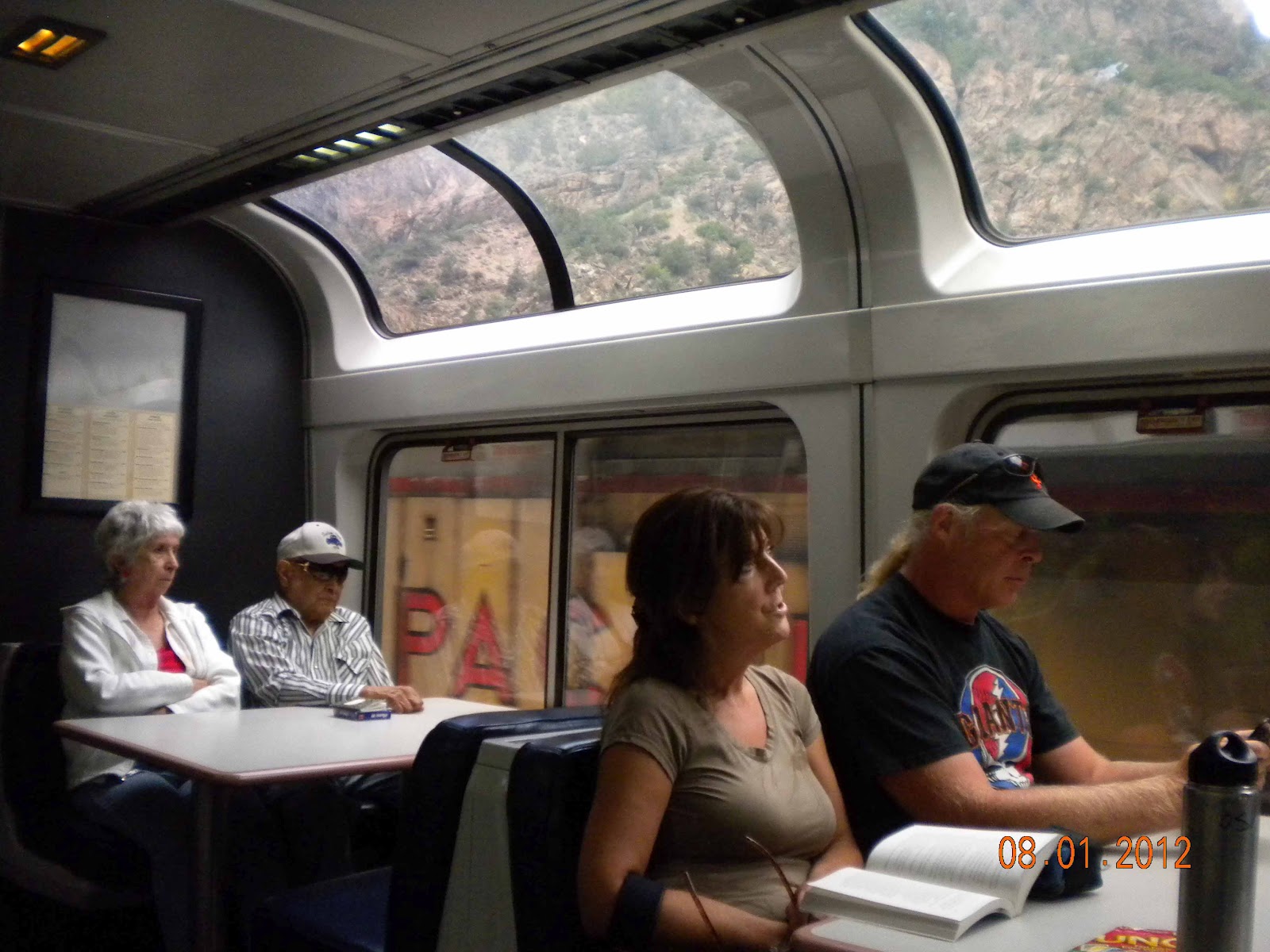 The view is best seen from (surprise! surprise!) the
observation deck, but it’s not too bad in the coach cars either (good size
windows all along the sides with curtains for those who want to sleep). The abundance
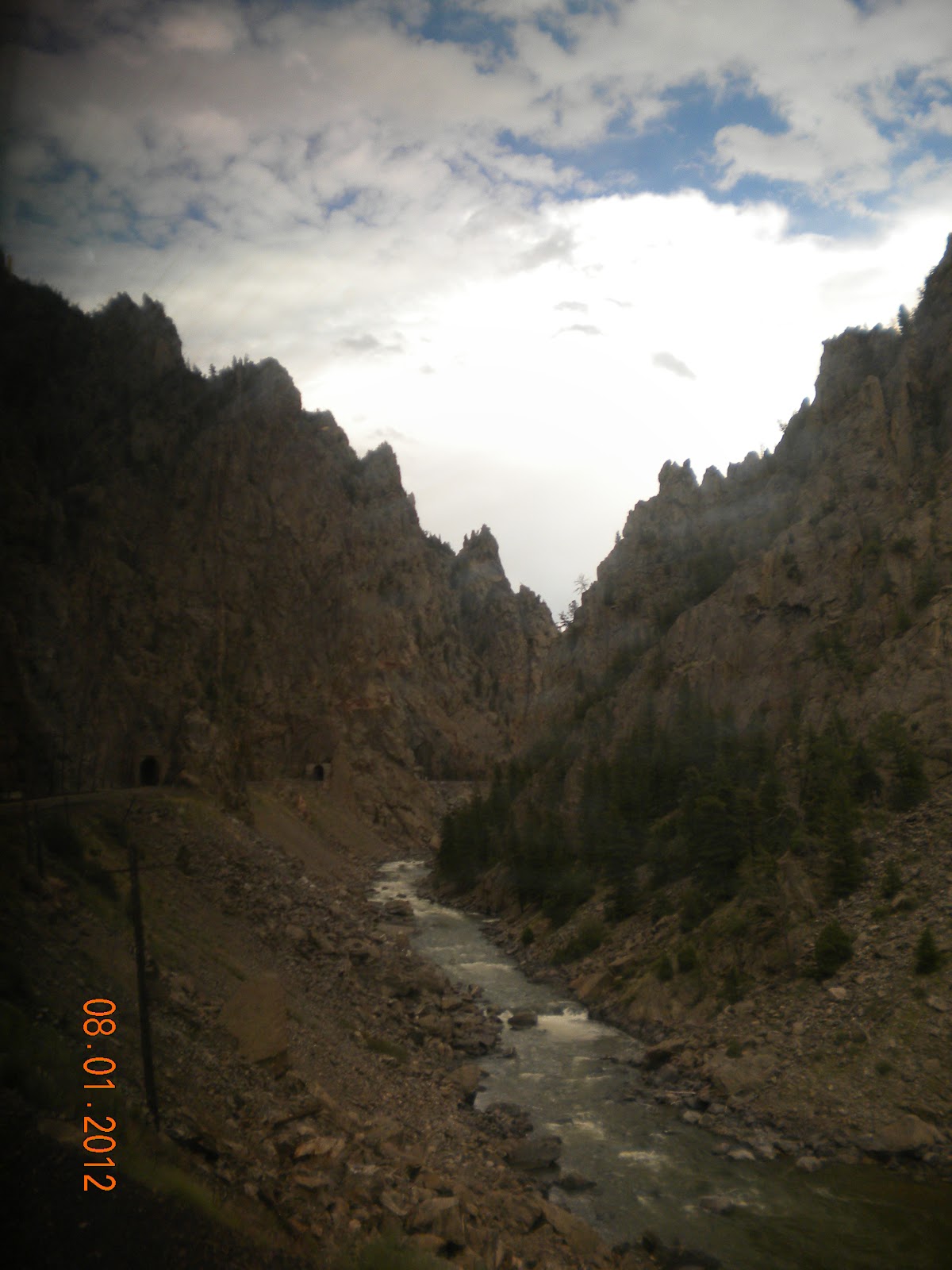
of scenery (We only traveled from Salt Lake City to Chicago, so I can’t speak
for the California and Nevada parts) is rocky canyons, sometimes forested. The
book cliffs in Utah look right out of a western movie, and the Mancos shale
makes for some interesting slopes. The many beautiful canyons that the Colorado
river has cut through provide so many opportunities for post-card quality
photos it almost becomes hackneyed until you review your photos. The final leg
of the journey is pretty flat and lots of corn and soy bean fields, which are beautiful
in their own way. Lots of pedestrians and campers waved at us friendly like,
but of course they couldn’t see us return the gesture through the heavily
tinted windows.
The view is best seen from (surprise! surprise!) the
observation deck, but it’s not too bad in the coach cars either (good size
windows all along the sides with curtains for those who want to sleep). The abundance
of scenery (We only traveled from Salt Lake City to Chicago, so I can’t speak
for the California and Nevada parts) is rocky canyons, sometimes forested. The
book cliffs in Utah look right out of a western movie, and the Mancos shale
makes for some interesting slopes. The many beautiful canyons that the Colorado
river has cut through provide so many opportunities for post-card quality
photos it almost becomes hackneyed until you review your photos. The final leg
of the journey is pretty flat and lots of corn and soy bean fields, which are beautiful
in their own way. Lots of pedestrians and campers waved at us friendly like,
but of course they couldn’t see us return the gesture through the heavily
tinted windows.Dining
 The train has gas-station to fine dining opportunities. A café
car, below the observation deck, has fruit, snacks, small cereal, bagels, hot
dogs, and other such tasty treats. The cashier heats up hot dogs and the like
for you in a microwave before giving them to you. The prices are roughly double
that of most convenience stores, $4.50 for a hot dog, $2.50 for a small cereal
bowl, $6.00 for a meat and cheese sandwich, but hot water and a fork for the
cup-of-noodles you brought: free. The dining car has booths with tables and
serves higher quality food for proportionally higher prices, which can be found
on this menu, though the prices given on this menu are a few dollars less than
the current costs.
The train has gas-station to fine dining opportunities. A café
car, below the observation deck, has fruit, snacks, small cereal, bagels, hot
dogs, and other such tasty treats. The cashier heats up hot dogs and the like
for you in a microwave before giving them to you. The prices are roughly double
that of most convenience stores, $4.50 for a hot dog, $2.50 for a small cereal
bowl, $6.00 for a meat and cheese sandwich, but hot water and a fork for the
cup-of-noodles you brought: free. The dining car has booths with tables and
serves higher quality food for proportionally higher prices, which can be found
on this menu, though the prices given on this menu are a few dollars less than
the current costs.Final tips
Taking the train is half the price of the cheapest plane
ticket, and much more comfortable, though it takes considerably longer. If you
want to enjoy you trip, be sure to have something to do: read a book, watch
some movies, bring some work, or whatever you like. The view is often great,
and provides a speed tour through the country and the edges of cities. Sleeping
can be difficult, bring a little pillow and light jacket or blanket (it gets
cold with the AC, even in 90 degree heat outside). Be sure to plan a good menu if
you bring your own food because it’s hard to enjoy a nice view or book when you’re
hungry. It’s not for everybody, but I think it’s a unique experience worth a
try.
Thursday, July 19, 2012
Insanely Twisted Shadow Planet
 |
| The Title Screen |
To start out with for some reason the artwork in this game and the fact that it was a puzzle/ platform game really caught my attention when I was looking at information about it. I enjoy games that are slightly different, from the regular blow up this shoot all the bad guy routine. Although this game is defiantly not as difficult as say Portal 2 its difficulty would probably be on part with Portal.
This game starts out with your home planet being taken over by some shadow alien creatures who then go and block all the light coming from your sun. So you as the alien dude that you are decide to go into your flying saucer and save they day. As you progress through the game you gain abilities such as a gun, a laser, a saw, a anti-gravity gun and a claw to pick things up with. Using these abilities you solve puzzles defeat bad guys and ultimately save the day. While this game does not break any graphic standards the 2-D graphics were nice and very artistic. also as the word Shadow, in the title suggests this game is slightly dark so I would not recommend it for children under about 6 or 7 as they might be frightened.
Although this games regular price is $15 which I don't think is worth it as you might get 5 or 6 hours of game play out of the single player campaign I would recommend it if you could get it for under $10 as it is very enjoyable and unlike other games the puzzles are engaging and it will keep you on the edge of your seat.
 |
| Screenshot from the Water zone, one of many areas in Insanely Twisted Shadow Planet |
Sunday, July 8, 2012
Windows 8 is it worth $40?
In Recent news It has been reported that Windows 8 upgrade will cost $39.99 going along with the last review does this make it worth the price? The answer is it depends. I still hold to the fact that Windows 7 is a much more functional operating system as of right now. The fact that Windows 8 is basically 2 operating systems in one body, makes it challenging to use and will lead to frustration by those of us who teach others how to use computers and those of us who need to learn the new OS. so my suggestion is unless you are a gamer, or need to use software that is proprietary through windows, go with one of Google's operating systems (Android or Chrome OS) or Keep your Windows 7 installation for a couple of years before upgrading.
Subscribe to:
Posts (Atom)